LinkedIn allows employees and employers to connect, building new futures together. Multiple businesses use LinkedIn as a means of recruiting new employees; therefore, your profile should always be updated with your current information. However, most people struggle to edit their profile in ways that will stand out to future employers. Therefore, today we will go through steps of improving your LinkedIn profile!
Getting Started with the Essentials
The biggest mistake people make on LinkedIn is that they use it as “a billboard rather than as a tool” (Verdonck, 2017). Most people download the social media site, answer the basic questions, and accept some invitations leaving it at that. However, more should be included, as you are making an impression of yourself before a meeting takes place. This is the main reason why the return on investment with social media is important (Verdonck, 2017).
I have googled myself multiple times, to see what employers will find. This is always a good first step because if employers can not find you at all, they will likely look elsewhere. Therefore, you should consider updating your presence, connectivity, presence, and creditability. Participate in groups, like, comment, post status to show you are informed (Verdonck, 2017). Credibility can be shown by posting long articles this raises your brand. Trust is the last step and can be done through thought leadership (Verdonck, 2017). This will make your profile stand out to professionals, increasing the likeliness that they will want to conduct business with you.
Being found on social media is the first place to start. If you are not found you will not get the opportunity. Therefore, you need to asses these questions:
- Are you being found by people using the correct spelling of your name? (Verdonck, 2017)
- How often is your name misspelled?
You can increase the chance of someone finding you, even if they spell your name wrong. People searching on LinkedIn can start typing before a name appear. If your name is misspelled often, it is smart to add a paragraph on your LinkedIn with different versions of your name. Therefore, you will still be found in the search. Verdonck has his alternative names in older experiences, as people do not look this far, but will still be able to find him on Google and Bing (Verdonck, 2017). It is also a good idea to add abbreviations and nicknames on your profile.
“Every word on your profile matter” (Verdonck, 2017). These terms help employers find you, therefore you should know what you should add to your profile to help you be found, start with your name and the variations (Verdonck, 2017).
Profile Pictures
Profile pictures are a must-have on LinkedIn, it was shown that 90% of users only visit profiles with pictures (Verdonck, 2017). Your picture should be professional, with limited personality as it can be added in other places. Therefore, your picture should be,
- Professional, with no drinks
- No holiday pictures
- It should only be you in the picture
- If the picture can not be cropped well, use a different picture
- Headshot is the best, not sitting at your desk, showing your feet or full body
- Smile and look relaxed as this should look inviting
- Have some light and look straight into the camera
- Up-date the picture so people feel connected to you
- Some branded pictures are acceptable
Along with your profile picture, there is also the brand picture to consider. For the picture, you can “reinforce a personal brand, but also your corporate brand” (Verdonck, 2017), as it helps assure people they are on the correct profile. However, do not overdo this picture, as it is just for support. To add the picture, click on the Me button in navigations then, click add a background, and choose from one the pictures your company has available.

I always test my pictures on different screens to ensure that they do not need any edits. LinkedIn always says that if you have a professional picture your profile is “11 times more likely to be viewed” (Verdonck, 2017)
Profile Headlines
The professional headline, your name, and photo are the most important elements of your profile (Verdonck, 2017). Therefore, you should add some excitement to the headline. People usually use their title and name of their company; this can come off as boring. I would recommend using keywords to describe you and your professional job. Your focus is efficiency, effectiveness with wit (Verdonck, 2017).
As well, try to stand out from your competitor by offering something free like your book, a report, or a sample if you have it (Verdonck, 2017). This will get more people to visit your profile. As well Verdonck recommends adding something personal as people tend to talk about it first, before business (Verdonck, 2017). Here are some pointers to help with your headliner:
- Why are they picking your profile?
- Explain what do and what you can do for them
- Offer something free to attract people to your LinkedIn
- Include a conversation starter or thought provoker
- Dividers help with readability
- You only have 120 words, make the most of them
Overall remember who your target audience is and appeal to them. Remember to never underestimate those three elements of your LinkedIn profile, as they will start a conversation with you through this information (Verdonck, 2017).
Location is very important, yet most people do not fill it out. Or they do not fill in their industry correctly, these are both important topics. Some help with location includes:
- Click on the blue pen, this will allow you to select your country
- Add your zip code
Most people have two zip codes, one for work and one for home. Therefore, you should add in the better option for you. For industries, they have an updated list in the exercise files, to make it easy for you to choose (Verdonck, 2017). This can be a challenge as you can only choose one so choose the one that fits best. This can be hard to add your location and choose your industry, but without this information, you may be passed upon opportunity simply because they couldn’t find your profile.
Your Contact Information
After an employer reads your profile, and they want more information, contacting is the next step (Verdonck, 2017). The information that your connection can see is your email, instant messenger, phone and address (Verdonck, 2017). Some tips to help with communication include:
- Ensure the email is correct, and it should be your professional one. You can change your primary email address on LinkedIn as well.
- You can also step up three skype accounts for instant messengers.
- Ensure your phone number is correct and it is your primary line
- You can add a physical address, and multiple addresses if you work for an international company
Some people do not like that type of information out there. However, Verdonck explains that he sends people to his LinkedIn account when they ask for his address (Verdonck, 2017). Not only does this avoid spelling mistakes but allows them to check out his LinkedIn (Verdonck, 2017). Remember all these will help ensure the opportunity will be presented to you.
The contact information visible to everyone include,
- Social media
which include
- a professional Twitter (you can add a few if you have several different accounts)
- Your websites (you can add up to 3 and customize the URL)
Another way to add your contact information is your current experience; explain to people what you do (Verdonck, 2017). You always want to ensure it is easy for people to do business with you; as it helps encourage them to come towards you with different offers.
Your Summary
Always ensure your summary is properly filled out; you should know what you want to accomplish in your summary (Verdonck, 2017). I prefer a simple summary that invites readers and encourages them to read on (Verdonck, 2017). Most people incorporate their company branding and can get a one-paragraph play text from their marketing team (Verdonck, 2017). However, depending on the organization you may need two paragraphs. Overall the goal is to give an overview of what the company does, therefore sub-headings may be a good idea to use.
Upon reading this, they may follow up with questions on your professional role. Give details and information but reframe from too much information. Provide a call to action at the end of the summary, by letting them know how they can get in touch with you. You can also tell them what you do not do and what does not interest you (Verdonck, 2017). This allows you to filter out people.
As well, include some personal branding, you can do this by sentences or keywords.
You can also have a great opportunity to add rich media to your profile. You can add in YouTube videos, PDF, Microsoft Word, or PowerPoint; these all increase the chance of people reaching out to you. But be cautious as you only have 2000 words in your summary, you want people to continue looking at your profile afterward.
Your Experience
LinkedIn is more than just online resumes; therefore, you should be presenting your results not just your resumes (Verdonck, 2017). For experience, bring in corporate branding again showing readers your organization and job. Elaborate more on your job since it can be so many things. Results are also important, it shows people you are proud of your job and reach results (Verdonck, 2017). For each experience you only have 2000 words, once again make them worth it and add a call to action.
However, do not breach any confidentially between you and your organization. Therefore, always talk to someone internally to ensure that you are not breaking any rules of the organization.
Prior experience is important to include, as it helps your readers understand your background (Verdonck, 2017). It is not about boosting yourself, but it explains how they can benefit from you. Therefore, you should include:
- What your previous job was
- The roles and responsibilities
- Achievements and enjoyments from that job
- What you learned
- Maybe corporate culture (do not breach any nondisclosure contracts)
- Variations for words
You only have 2000 characters to describe your roles, so think about your audience. Add an active call to action, to make connections and conversation (Verdonck, 2017). Add as much experience, however, make sure that it is still relevant. By using your profile as a tool, you can explain to people an overview of your career.
Once again you can use rich media in your experiences, to add to your story. Most people. publish their professional PowerPoint for people to see. This is important because
- It encourages people to spend more time looking at your profile
- It gives visual clues to who you are
Once you publish your PowerPoints you can make edits to them, to increase people’s understandings of them.
Create Your Brand
The most important aspect of your LinkedIn is showing people your uniqueness and value. Always check over your list, ensuring it is up-to-date and tells your story the best. You should:
- Add awards you have received that are relevant to your career field
- Mention the date, who awarded you, and a brief description
- Add patents you may have
- Add the co-inventor, the status of the patent, dates, and a brief description
- Add layman’s with the abbreviation that is known within the industry
- Add certifications
- Mention the certification authority and license number
Within LinkedIn, you can showcase your work and connect it to your colleagues and customers (Verdonck, 2017). Not only does it make your LinkedIn seem more interesting, but it also shows what you have done for others.
When adding your project, always give it an attractive name to entice people to read on about it (Verdonck, 2017). You should add the dates of the project and invite your clients to add the same project. Increasing the traffic to your page from your clients. By adding colleagues, it shows that you are a team player.
As well, for projects, link it to your occupation, add the project URL and a short description (Verdonck, 2017). Before you do this check over the confidentiality agreement before sharing this content. By adding multiple successful projects, it shows people:
- That you have multiple successful projects
- Results of a unique project add value to your target audience
LinkedIn is one of the most underutilized publishing platforms; however, when used correctly it can take you around the globe, finding introducing you to industry, prospect, or clients (Verdonck, 2017). You have the ability to:
- See what others are reading
- Stay on top of the news
- Learn from influencers
- Build your brand
You can add by adding an article, you should have a captivating picture, title, include a link, or a picture and a video. All these increases views, once posted you have the ability to see who has liked, added comments, or viewed your article. Here are some tips on writing an article:
- Use your specific area of expertise
- Write in your speaking voice
- Think about your title
- Use precision (number, statics, examples)
- Keep it between 300-500 words
- Post weekly, the best is Thursday or Sunday
- When posting, update your status on LinkedIn and other social media platforms
When you have a successful article, LinkedIn takes it and emails it to people who it believes the article applies to (Verdonck, 2017).
Sharing the knowledge you have is very important, especially in networking. A good way to do this is through giving and receiving, as you are answering a question but expect nothing in return. However, that person may take the information and spread, this can be especially good for a company. You can share this information on your LinkedIn profile, spicing it up even more. It can even be done with rich media and increase the number of downloads of the information. After all, the more your start sharing the more you start receiving and it starts by sharing on your LinkedIn (Verdonck, 2017).
Skills and Recommendation
Having social proof of your skills is important on LinkedIn and your skills should be mentioned in your profile. However, you used to concentrate on using appropriate skills that reflect you on your profile. Some tips when making your skills list include:
- Leave out skills that are not relevant to your profile
- Do not add in the use of hard drugs or money laundering
- Do not only use clique words such as motivated, passionate, responsible, etc. out
- Add in professional skills that highlight you
- Choose broad skills
- LinkedIn can auto-complete the list for you if you choose and you can add the skills, they missed
- You should check who is endorsing your skills, but you can also stop people from endorsing you if you desire
Overall just ensure you choose the skills that endorse and describe you well, as this is your first impression (Verdonck, 2017).
You should have recommendations on your profile, as it is an important part of your LinkedIn account. Have at least 5-7 if not more as this makes you more reputable and helps ensure the person they have landed on the correct profile. Some people decide to ask, I wait until someone offers it to me, as it may become awkward and uncomfortable asking for one. However, if you want to them, always give them an out and ask if they want input from you (Verdonck, 2017).
You can send them a draft of the recommendation on LinkedIn. When having a recommendation always add the relationship and ensure the message is professional, yet personalized (Verdonck, 2017). A recommendation should not be taken lightly, these are supposed to be genuine and show people your results (Verdonck, 2017).
Your Education
Your education is important and has an impact on your profile. For school, you should add:
- Your college or university
- The degree you received
- Grades if they are worth mention
- Extracurricular activities you participated in
- When you attended
- A description upon why you felt motivated to enter this field
- Add your thesis if applicable and repeat for all your education
You can add your high school if you want to connect with people or inspire someone who just graduated (Verdonck, 2017). Overall, your education is much more important on LinkedIn than people give it credit for.

By adding your continuous education on your profile, shows others learning is important to you (Verdonck, 2017). On LinkedIn, you can show off your education and certification in multiple areas. Tips for adding courses include:
- Interesting ones that apply to your target audience
- Ensure your sources are updated
- Add the name and the number if applicable
- Mention certification too
- LinkedIn watches profile to ensure these course and certifications are valid
- Add test scores if it relevant
Overall this shows you are willing to evolve with the world, rather than someone who is not; increasing your value on your LinkedIn (Verdonck, 2017).
Make the Most of Your Personality
Always add personal branding! This makes you interesting and increases people’s curiosity. Add it in places that it makes sense, for example, professional headline, summary, experience, volunteering experience (Verdonck, 2017). By adding personal touches, it creates a relationship between you and the customer. Remember your goal is not to please everyone, give priority to the target audience (Verdonck, 2017).
Volunteer work is important to add, it not only shows you can multitask but also allows you to make a connection (Verdonck, 2017). For volunteer experience start by:
1. The volunteer experiences
2. Add the organization
3. Include the role
4. Enter the dates
This can make common ground for people, therefore a call to action is usually followed by the visitor on your page. Volunteer work is great an ice breaker and shows people that you are passionate about your profession and others.
Extra Strategies to Stand Out
Regarding busting myths and search engine optimization or SEO; keywords help target audiences find you (Verdonck, 2017). This may be hard but use Google as a tool to help with this. By thinking about your target audience, it eliminates wasted time on people that may not fit their organization. Think about the searches, words, phrases, and spelling they might use to find you (Verdonck, 2017).
Once you have found your keywords and alternatives, insert them in your profile where you wish. However, ensure that they are natural and not artificial. When using search engines and LinkedIn, extreme keyword density does not work and you get punished for it (Verdonck, 2017). By applying these keywords, it will increase your chances of being found by future connections.
LinkedIn groups are a great opportunity to meet people, but before joining ensure your profile is perfect.
When you become more active, more people visit your profile, ensure everything is up-to-date and relevant for your target audience. Overall focus on helping others and answer their question, socially if you claim to be an expert in something some them (Verdonck, 2017). This should always be the main focus, rather than selling your self first (Verdonck, 2017). When in these groups, you pop up on other radar, therefore when answering questions be aware you are answering the question for multiple people (Verdonck, 2017).

Followed leaders and influencers are on LinkedIn, choose who inspire you and follow them (Verdonck, 2017). I follow people who have influenced my career. Once you follow them, become active by liking, sharing and commenting on their material. Add personal touches as this helps increase your chances of interacting with them.
You can have different privacy setting within LinkedIn, that many people do not know. Some important information with these settings includes:
- You can choose to
have your name and headline, private profile characteristics, or private mode
(Verdonck, 2017)
- The first choice allows you to show others you have viewed their profile and you can see when people have viewed yours
- Another option allows you to limit the number of people reaching out to you
- You can choose whose invitation to accept and who to send an invitation to
- You can also choose what kind of messages you want to receive
With your privacy settings, you can choose how physical, approachable, and successful you will be on LinkedIn, ensure you choose what is right for you (Verdonck, 2017). LinkedIn also has a mobile app you can download. Here are some tips when using the app:
- Your search history shows on your web and app version
- You can send a personal note when inviting people
- You write upside on the app, showing people your humor and enabling them to remember you
By adding personal touches, a small icon shows your fun side and that you are a human. This increases the chance of your connections.
Next Steps
Even though you may have updated your LinkedIn profile today, ensure you keep up with this. Set action, goals, and outcomes your desire to ensure you keep up with your LinkedIn. By having an action plan in place, it will keep your focus and save you time (Verdonck, 2017). Some people use buddies to keep themselves accountable for their action plans.
Always ensure your updates are off until you switch them on. This will inform your connections of a change to your profile, do not update daily as that can get annoying for others. Verdonck suggests reviewing and updating your LinkedIn quarterly (Verdonck, 2017). This way it keeps your connection updated with the changes to your personal and professional life.
Conclusion
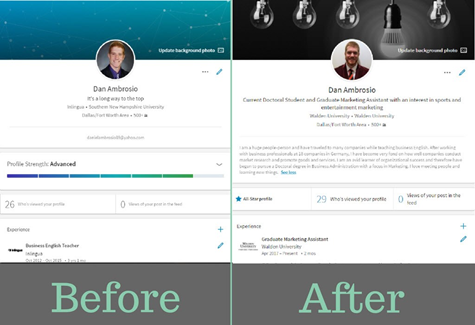
Above you will see a before and after picture on LinkedIn account that has been updated. This is not my account; however, it is a good example of how people can change their account for the better. There is a huge difference from the first to the second. He has changed his profile picture in the after to something more professional and added a background picture that relates to his job. He has changed his headline-making it more professional and personal. He has added his university and his location. As well as an in-depth summary. His views have gone up on his profile overall.
Though these differences may seem small they are very impactful. His after picture looks much more professional and welcoming than his first. Through the use of the tips that I have supplied you with today, I hope you can better your LinkedIn.
Until the next post!
References:
Verdonck, B. (2017, March). LinkedIn Profiles for Social Business Success [Video File]. Retrieved from https://www.lynda.com/LinkedIn-tutorials/Communicate-changes-your-LinkedIn-network/512777/581612-4.html?srchtrk=index%3a1%0alinktypeid%3a2%0aq%3alinkedin+profiles+for+social+business+success%0apage%3a1%0as%3arelevance%0asa%3atrue%0aproducttypeid%3a2

 Marketing Blog